
Reviewer’s note: In this Manychat review, I am looking at the platform from a practical product-review perspective: what it does well, where it may feel limited, who should use it, and whether it deserves a place in your marketing stack.
Manychat is a chat marketing and automation platform designed to help creators, eCommerce brands, agencies, and businesses automate conversations across social and messaging channels. Its biggest promise is simple: turn conversations into leads, sales, follow-ups, and customer engagement without forcing you to manually answer every message.
Quick Verdict
Manychat is best for: creators, coaches, small businesses, eCommerce stores, social media marketers, agencies, and brands that get leads or sales from Instagram, Messenger, WhatsApp, or TikTok.
Not ideal for: businesses that do not rely on social messaging, teams needing deeply customized enterprise-level chatbot logic, or users who want a fully free solution at scale.
Bottom line: Manychat is one of the most accessible chat automation tools for turning DMs, comments, opt-ins, and customer conversations into automated marketing flows.
Want to Try Manychat?
If your business receives leads, questions, or sales conversations through social media, Manychat is worth testing with a simple automation first.
Start with Manychat for FreeTable of Contents
What Is Manychat?
Manychat is a no-code automation platform built for conversational marketing. Instead of relying only on landing pages, email forms, or manual inbox replies, Manychat lets you create automated chat flows that respond to comments, direct messages, keywords, button clicks, and other triggers.
For example, a creator can ask followers to comment a keyword like “GUIDE” under an Instagram post. Manychat can then automatically send a direct message with a lead magnet, ask for an email address, tag the contact, and move the person into a follow-up sequence.
From a reviewer’s point of view, the biggest reason Manychat stands out is that it focuses on where modern customer conversations already happen: social messaging platforms. Many businesses do not struggle because they lack interest; they struggle because they cannot reply fast enough or follow up consistently.
Key Features of Manychat
1. Visual Flow Builder
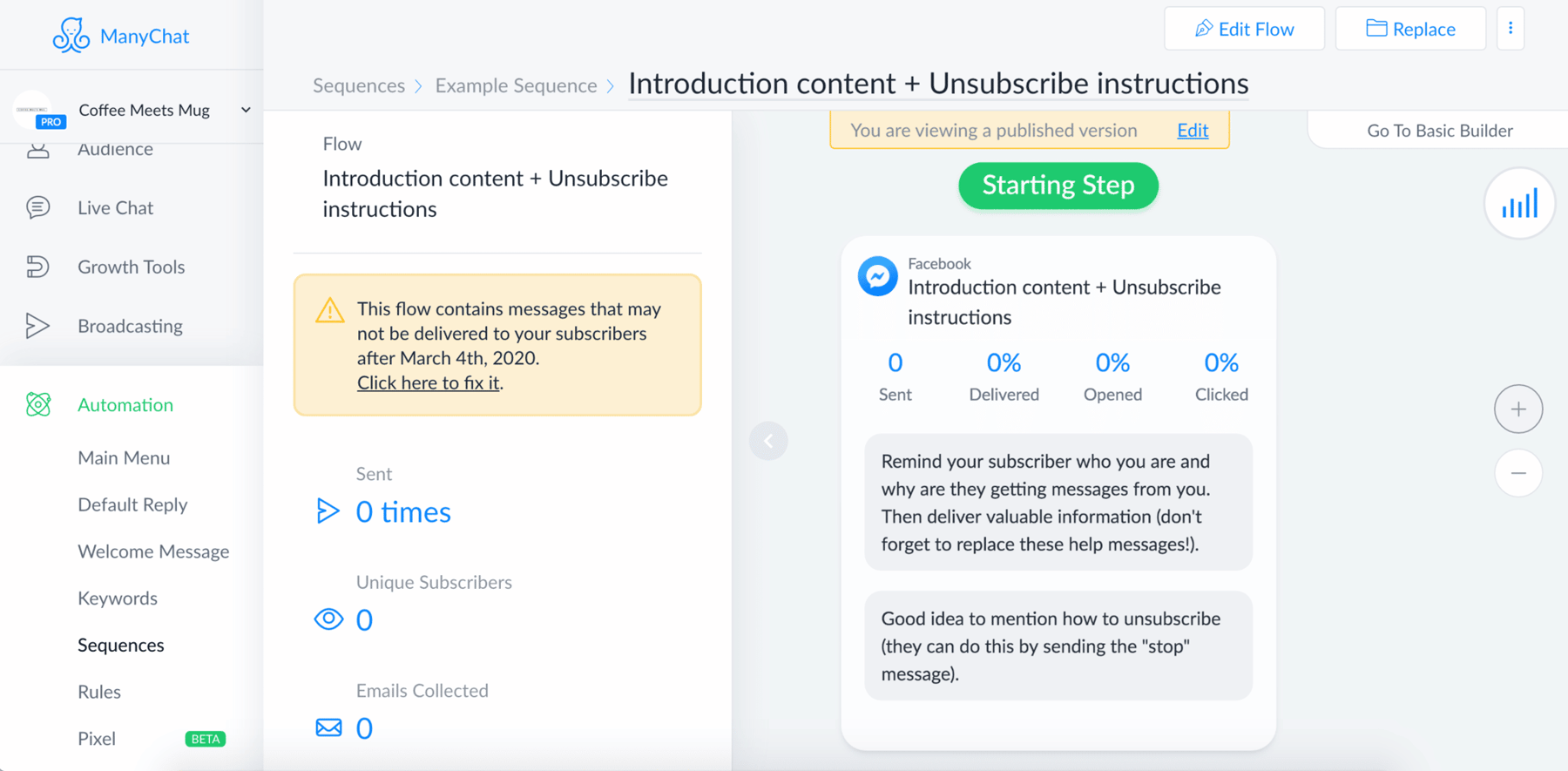
The visual flow builder is the core of Manychat. It allows you to create conversation paths using messages, buttons, conditions, delays, tags, and actions. You do not need to code. You can map a simple welcome flow, a lead generation funnel, or a multi-step campaign using a visual interface.
This is where Manychat feels especially beginner-friendly. Instead of looking at technical chatbot logic, you can see the conversation as connected blocks. That makes it easier to understand what the user will receive, where they will click, and what happens next.
2. Instagram DM and Comment Automation
Manychat is especially strong for Instagram automation. If your marketing strategy includes reels, posts, stories, comments, and DMs, this is one of the most valuable parts of the platform. You can build automations that reply to comments, respond to story mentions, start DM conversations, collect opt-ins, and guide users toward your offers.
This feature is useful for creators selling digital products, coaches booking calls, eCommerce brands promoting products, and agencies running campaigns for clients.
3. Multi-Channel Messaging
Depending on your plan, Manychat can support multiple messaging channels such as Instagram, Facebook Messenger, WhatsApp, TikTok, Telegram, SMS, and Email. This gives you a more flexible way to manage customer conversations across platforms instead of treating each channel as a separate marketing silo.
4. Broadcasts and Sequences
Manychat also supports broadcasts and sequences. A broadcast lets you send a message to a selected audience, while a sequence works more like a drip campaign. For example, you can send a lead magnet today, a value-based message tomorrow, and a product offer later in the week.
5. Tags, Segmentation, and Contact Management
Manychat allows you to tag users based on actions they take. For example, you can tag someone as “interested in course,” “requested coupon,” “clicked pricing,” or “VIP customer.” This makes your follow-up more relevant because you are not sending the same message to everyone.
For a small business, this can be extremely helpful. You can separate cold leads from warm leads, customers from non-customers, or Instagram leads from WhatsApp contacts.
6. AI-Assisted Conversations
Manychat has been adding AI features to help businesses respond faster, answer FAQs, and guide conversations toward specific goals. This is useful for repetitive questions such as pricing, availability, shipping, booking instructions, product recommendations, or lead qualification.
However, I would not recommend letting AI run everything without review. The best setup is usually a mix of structured flows, clear business rules, and AI assistance for common questions.
User Experience: Is Manychat Easy to Use?
In my view, Manychat’s strongest advantage is usability. A lot of automation tools are powerful but intimidating. Manychat feels more approachable because it is visual, organized, and built around real marketing actions rather than abstract automation logic.
The platform also gives you templates and examples, which can shorten the learning curve if you are new to chat marketing.
That said, “easy to start” does not mean “impossible to make mistakes.” Poorly written automations can feel robotic, spammy, or confusing. The tool is only as good as the strategy behind it. If you build too many messages, use unclear buttons, or push offers too aggressively, users may ignore or unsubscribe from your messages.

Manychat Pros and Cons
Pros
- Beginner-friendly visual automation builder.
- Excellent for Instagram DM and comment automation.
- Useful for lead generation, sales funnels, and customer engagement.
- Supports multiple messaging channels depending on the plan.
- Good segmentation with tags and custom fields.
- Templates and automation examples help new users get started faster.
- Can reduce manual inbox work for creators and small teams.
Cons
- Pricing can increase as your contact list and needs grow.
- Advanced setups still require planning and testing.
- Not every business needs chat automation.
- Some channels and advanced features are plan-dependent.
- Badly designed flows can feel spammy if you over-automate.
- You still need to follow platform rules and messaging policies.
Manychat Pricing
Manychat offers a free plan and several paid plans. The exact price can change over time, so I recommend checking the official pricing page before publishing or updating this review.
| Plan | Best For | Reviewer’s Take |
|---|---|---|
| Free | Testing the platform and building basic automations. | Good for learning Manychat, but serious campaigns will likely need a paid plan. |
| Essential | Small businesses and creators who want more automation flexibility. | A practical entry point if you are ready to use automation consistently. |
| Pro | Growing businesses, agencies, and marketers using multiple channels. | Probably the best fit for users who want more serious marketing automation. |
| Business / Advanced | Larger teams, higher-volume messaging, and more advanced requirements. | Worth considering if chat automation is already a major part of your sales or support process. |
My advice is simple: start small. Build one automation that has a clear business goal, such as collecting leads from Instagram comments or answering a common pre-sale question. If that automation saves time or generates revenue, upgrading becomes easier to justify.
Compare Plans Before Upgrading
Before choosing a paid plan, check which channels, users, automations, AI features, and branding options are included.
Compare Manychat PlansBest Use Cases for Manychat
Creators and Influencers
Manychat is very useful for creators who promote lead magnets, courses, newsletters, webinars, digital products, communities, or affiliate offers. A common workflow is: ask followers to comment a keyword, send an automated DM, collect an email address, and deliver the resource instantly.
eCommerce Stores
For eCommerce brands, Manychat can help with product discovery, coupon delivery, customer questions, order-related communication, and promotional campaigns. It can also help move interested shoppers from social engagement into a more direct buying conversation.
Coaches, Consultants, and Service Businesses
Service businesses can use Manychat to qualify leads, answer FAQs, send booking links, and guide users toward calls or consultations. This works especially well when the business already gets leads from Instagram, Facebook, or WhatsApp.
Agencies
Agencies can use Manychat to build automated campaigns for clients. This is especially valuable for clients who run promotions, launches, events, webinars, or lead generation campaigns through social media.
What I Like Most About Manychat
What I like most is that Manychat connects automation with actual user behavior. Someone comments, clicks, replies, or asks for something, and the automation responds in context. That feels more natural than sending cold messages or forcing people through generic funnels.
The second thing I like is how fast you can launch a basic automation. You do not need a developer, a complicated tech stack, or weeks of setup. For many small businesses, that speed is a major advantage.
What Could Be Better?
Manychat can become more complex as you add more flows, tags, channels, and conditions. If you do not organize your automations carefully, your account can become messy. Naming conventions, clear tags, and regular cleanup are important.
I would also recommend watching costs as your audience grows. Chat automation can produce a strong return, but only if your flows are connected to measurable goals such as leads, bookings, sales, support savings, or repeat purchases.
Manychat Alternatives
Manychat is not the only automation tool available. Depending on your business model, you may also compare it with tools such as Chatfuel, MobileMonkey, Tidio, Intercom, HubSpot, or customer support platforms with chatbot features.
However, if your main focus is Instagram, Facebook Messenger, WhatsApp, and social-first automation, Manychat remains one of the most relevant tools to review first.
Final Verdict: Is Manychat Worth It?
Yes, Manychat is worth it if your business gets attention, questions, leads, or sales opportunities through social media messaging. It is especially valuable for Instagram-focused creators, eCommerce stores, coaches, agencies, and small businesses that want to automate repetitive conversations without losing the personal feel of chat.
It is not a magic button for sales. You still need a strong offer, clear messaging, useful content, and a thoughtful follow-up strategy. But as a tool for turning social engagement into automated conversations, Manychat is impressive.
My recommendation is to start with one simple automation: a comment-to-DM lead magnet, a welcome flow, a product recommendation flow, or a FAQ automation. Measure the result. If it saves time or creates leads, then Manychat can become a core part of your marketing system.
Ready to Build Your First Chat Automation?
Start with one simple flow, test it with real users, and improve it based on replies, clicks, and conversions.
Try Manychat AutomationsFrequently Asked Questions About Manychat
Is Manychat good for beginners?
Yes. Manychat is beginner-friendly because it uses a visual builder and does not require coding. New users can start with basic automations and gradually build more advanced flows.
Can Manychat automate Instagram DMs?
Yes. Instagram DM automation is one of Manychat’s strongest use cases. It can help automate replies, keyword-based conversations, comment-to-DM campaigns, and lead capture workflows.
Does Manychat have a free plan?
Yes. Manychat offers a free plan, but paid plans unlock more features, channels, and advanced capabilities. Always check the official pricing page before choosing a plan.
Is Manychat only for Instagram?
No. Manychat supports multiple messaging channels depending on the plan, including Instagram, Facebook Messenger, WhatsApp, TikTok, Telegram, SMS, and Email.
Who should use Manychat?
Manychat is best for creators, eCommerce stores, coaches, agencies, brands, and small businesses that rely on social messaging for leads, sales, support, or audience engagement.
Can Manychat replace human support?
Not completely. Manychat is excellent for automating repetitive conversations, but complex questions, sensitive issues, and high-value sales conversations may still need a human response.