Trello Review: A Visual Way to Organize Work, Tasks, and Team Flow
Discover why Trello remains a favorite for visual task management, boards, automation, integrations, and flexible team collaboration.
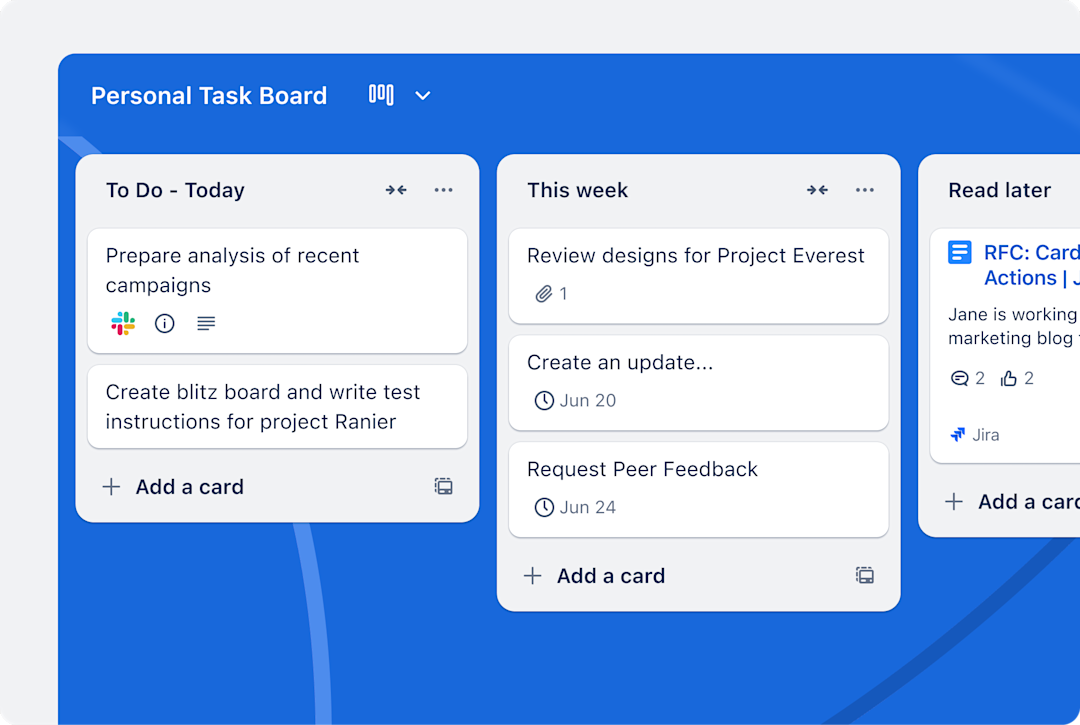
Trello is one of the most recognizable names in visual work management for a reason: it makes organizing work feel simple, visible, and approachable.
Whether you are planning personal tasks, running a small team, or coordinating cross-functional projects, Trello gives you a lightweight structure built around boards, lists, and cards.
This review explains why Trello still works so well in a crowded productivity market.
What is Trello?
Trello is a visual work management tool built around a straightforward model: boards contain lists, and lists contain cards. That structure is simple enough for beginners but powerful enough for teams that want a shared visual workflow.
At its core, Trello helps people capture tasks, organize work, track progress, and collaborate in a way that feels immediately understandable. Instead of asking users to learn a complex system, it starts with a simple visual metaphor and lets them build from there.
That ease of entry is one of Trello’s biggest strengths. People can start quickly, then add more sophistication over time with automation, integrations, templates, and additional views.
Why Trello still matters
A lot of productivity tools try to do everything at once. Trello succeeds because it makes work visible with minimal friction. Teams do not need a long onboarding process to understand what is happening. You can open a board and see tasks, ownership, progress, and bottlenecks almost instantly.
That visual clarity is especially valuable in environments where work is constantly moving: marketing campaigns, small-team coordination, editorial pipelines, onboarding, operations, and personal productivity systems.
| Why users like it | What that means in practice |
|---|---|
| Simple interface | People can adopt it quickly without heavy training. |
| Visual organization | Tasks are easier to understand and move through stages. |
| Flexible structure | Works for personal workflows, teams, and many project types. |
| Expandable system | Automation, Power-Ups, and integrations add capability as needed. |
Core features that make Trello useful
1. Boards, lists, and cards
This is Trello’s foundation. Boards represent major workflows or projects. Lists reflect stages, categories, or time horizons. Cards represent the actual work. The model is simple, but that simplicity is exactly what makes Trello easy to adopt.
2. Inbox, Boards, and Planner
Trello increasingly positions itself as a broader productivity system rather than only a Kanban board tool. Inbox helps users capture tasks quickly. Boards organize work visually. Planner helps align priorities with time on the calendar.
3. Automation
No-code automation is one of Trello’s most valuable upgrades for teams. Repetitive actions such as moving cards, assigning members, or triggering routine workflow steps can be automated so the board keeps moving without manual nudges.
4. Power-Ups and integrations
Trello becomes much more powerful when it connects to the tools your team already uses. Integrations and Power-Ups help users extend the platform for communication, planning, reporting, and ecosystem fit.
5. Templates
Templates reduce the time needed to set up useful workflows. For teams that repeat similar processes, templates make Trello easier to standardize and scale.
6. AI-enhanced productivity
Trello is also emphasizing AI within its product direction, particularly for Premium and Enterprise users. That adds another layer for teams that want faster capture, summaries, and productivity support.
Best use cases for Trello
Trello works best when visual progress matters and when teams want a system that feels clear rather than complicated.
- Task management: ideal for personal and shared to-do systems.
- Content and editorial workflows: excellent for tracking drafts, reviews, approvals, and publishing steps.
- Marketing coordination: useful for campaign planning and deliverable tracking.
- Small project teams: strong for fast-moving collaboration without enterprise overhead.
- Operational checklists: effective for repeatable processes that benefit from visible stages.
For highly regulated, deeply resourced enterprise planning, some organizations may need more specialized systems. But for clarity, speed, and adaptability, Trello remains highly effective.
Who should use Trello?
Trello is a great fit for individuals, startups, creative teams, operations groups, and any team that values visual simplicity. It is especially strong when adoption speed matters more than feature overload.
| User type | Why Trello fits |
|---|---|
| Individuals | Easy way to manage personal priorities and recurring tasks. |
| Small teams | Fast setup and shared visibility without process drag. |
| Creative and content teams | Card-based workflows map naturally to production stages. |
| Remote teams | Visual boards help keep context visible across async work. |
| Managers | Can see status and blockers quickly without chasing updates. |
Trello is often the right choice when a team needs organization now, not after weeks of setup.
How to get started with Trello fast
The easiest Trello rollout starts with a single board and a clear workflow. Keep your first setup lightweight so people can focus on using the system instead of debating structure.
- Create one board for one outcome, such as content production or weekly team tasks.
- Use simple lists like Backlog, Doing, Review, and Done.
- Put one task per card and add due dates, owners, and checklists where needed.
- Introduce automation only after the team understands the base workflow.
- Review the board weekly and remove clutter that does not help progress.
Trello becomes powerful when teams preserve simplicity while adding only the structure they actually use.
Final verdict
Trello remains one of the best tools for visual task management because it solves a universal problem elegantly: people need to see work clearly. Its combination of simplicity, flexibility, automation, and visual organization makes it useful for individuals and teams alike.
If you want a productivity tool that is easy to start, pleasant to use, and capable of growing with your workflow, Trello is still one of the smartest options available.
Frequently asked questions
What is Trello best for?
Trello is best for visual task management, team collaboration, and workflows that benefit from boards, lists, and cards.
Is Trello good for personal productivity?
Yes. Trello works very well for personal planning, habit systems, and simple project organization.
Can teams automate work in Trello?
Yes. Trello includes no-code automation features that help move work forward with less manual effort.
Who should use Trello?
Individuals, small teams, creative teams, and operational groups that want clear, visual workflows should consider Trello.