Bright Data is best understood as a web-data platform, not simply a proxy provider. It combines proxy networks with managed scraping APIs, cloud browsers, custom scrapers, ready-made datasets, and enterprise data services. That breadth makes it a strong option for demanding data operations, but it also creates more product and pricing complexity than a small project may need.
Choose Bright Data when public web data is an important business input and you need multiple collection methods, geographic control, managed unblocking, or a path from raw access to structured data. Consider a simpler provider when the project is small, occasional, or limited to one easy-to-access source.

Compare the product, output quality, usage unit, and estimated monthly cost before expanding.
Explore Bright DataAffiliate disclosure: PrimeReview may earn a commission if you sign up through this link, at no extra cost to you. This does not affect our editorial assessment.
What is Bright Data?
Bright Data provides infrastructure and managed services for collecting public web data. A team can use a proxy network directly, send requests to an unblocking or scraping API, connect automation code to a managed browser, run a prebuilt scraper, create a custom scraper, or buy an existing dataset.
These options solve different problems. Raw proxies give developers greater control over their own collection stack. Managed APIs remove more of the work around IP rotation, browser rendering, CAPTCHA handling, retries, and parsing. Datasets go further by delivering already collected records instead of requiring the customer to operate a scraper.
The practical advantage is room to change approaches without immediately changing vendors. The practical disadvantage is that a new customer must first identify which Bright Data product matches the workflow. Buying proxy bandwidth for a task better suited to a structured scraper API—or building a scraper when an appropriate dataset already exists—can add unnecessary engineering and cost.
Bright Data products and where they fit
Proxy networks: maximum control, greater responsibility
Bright Data lists four main proxy categories: Residential, ISP, Datacenter, and Mobile. Datacenter proxies are generally the economical option for targets that do not require a residential identity. ISP proxies provide static residential-style addresses, while rotating Residential and Mobile networks are intended for more demanding location or access requirements.
This route suits teams that already have request logic, parsing, retries, monitoring, and storage. The proxy provides network access; it does not automatically turn pages into clean business records. Teams also need to review target-site rules, privacy obligations, and applicable law before collecting data.
Bright Data states that access to its Residential or Mobile networks may involve a compliance or know-your-customer review. That is an operational consideration, not merely a signup detail, especially for an individual user expecting immediate anonymous access.
Web Access APIs: outsource unblocking, not the entire pipeline
Web Access APIs address access and rendering challenges while allowing the customer to control what is requested and how results are processed. The current product family includes Unlocker API, Crawl API, Search API, and Browser API.
Unlocker API is appropriate when a program already knows which pages to request but needs managed proxy rotation, sessions, retries, or challenge handling. Crawl API is aimed at broader domain crawling and web content transformation. Search API returns structured search-engine data. Browser API is intended for JavaScript-heavy pages and multi-step interactions.
Browser API: managed browsers for interactive targets
Browser API lets developers connect Puppeteer, Playwright, or Selenium scripts to hosted browser infrastructure. Bright Data manages browser instances, proxy rotation, fingerprint behavior, sessions, CAPTCHA handling, and scaling while the customer writes the navigation and extraction logic.
This is useful when a static HTTP request cannot reproduce the page state or user journey needed for collection. It is less attractive for simple pages because browser traffic is heavier and the product is billed by data transferred. Choosing it by default can add cost and complexity when an API or prebuilt scraper would be sufficient.

Scraper APIs: structured records without managing the lower layers
Bright Data documents more than 660 prebuilt scrapers for popular websites and data categories. Instead of maintaining proxy selection, browser logic, and parsers, a customer sends inputs and receives structured output.
The scraper library supports synchronous calls for suitable quick requests and asynchronous jobs for larger or more complex batches. Results can be delivered through API download, webhooks, cloud storage, SFTP, and other supported destinations in formats such as JSON, NDJSON, and CSV.
This managed approach can reduce maintenance, but it also makes record definitions important. Before committing, inspect a sample, confirm which fields are available, determine how missing or changed fields are handled, and calculate cost using the number of records the workflow actually needs.
Scraper Studio: a custom path between APIs and a DIY stack
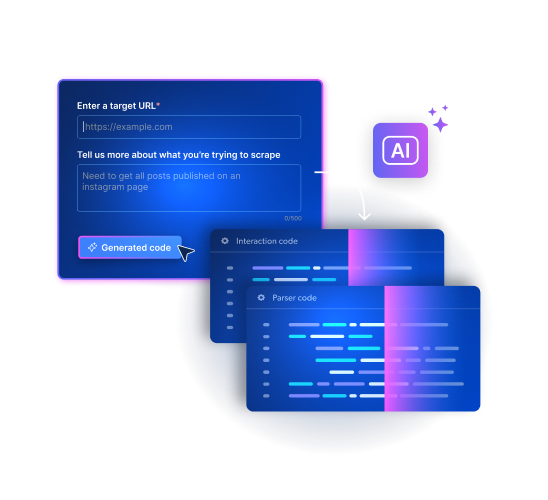
Scraper Studio is positioned for targets not covered by the exact prebuilt workflow a team needs. Its interface can generate a starting point from a target URL and written extraction request, while still exposing code for customization.
The appeal is speed to an initial implementation without completely hiding the scraper logic. The limitation is the same as with any generated or custom extraction: the workflow still needs validation, field-level quality checks, and a maintenance plan when the target site changes.
Datasets: buy the output instead of operating collection
Ready-made and custom datasets can be the simplest Bright Data product when the required information is already available in a suitable schema and update schedule. This approach avoids building the collection process and shifts evaluation toward coverage, freshness, field completeness, delivery format, and licensing terms.
A dataset is not automatically the cheapest choice, but it may have a lower total operating cost than developing and maintaining a scraper. Ask for a representative sample and compare the records with the decisions or model inputs they need to support.
How Bright Data pricing works
Bright Data does not have one simple platform price. Each product has its own usage unit, such as requests, records, bandwidth, IP addresses, or dataset volume. This makes the service flexible, but it also means a buyer must estimate the correct unit before comparing costs.
The starting prices below were checked on the official Bright Data pricing page on July 27, 2026. Several prices were displayed as promotional or minimum starting rates, so treat this as an orientation—not a quote for a specific workload.
| Product | Displayed starting rate | Primary usage unit | Budget question |
|---|---|---|---|
| Unlocker API | From $1 per 1,000 requests | Requests | How many successful target requests will run each month? |
| Browser API | From $5 per GB | Transferred data | How much page traffic will each browser workflow transfer? |
| Scraper APIs | From $0.75 per 1,000 records | Delivered records | What counts as a billable record for the selected scraper? |
| Scraper Studio | From $1 per 1,000 requests | Requests | How many pages and retries does the custom workflow require? |
| Datasets | From $250 per 100,000 records | Records and delivery scope | What coverage, freshness, fields, and update frequency are needed? |
| Proxy networks | Varies by network and commitment | GB or allocated IPs | Which network, location controls, bandwidth, and session behavior are required? |
The best cost comparison uses a representative workload. Measure the number of target requests, successful records, transferred data, retries, engineering time, and expected maintenance. A lower unit price can be misleading if the product leaves more extraction and reliability work to your team.
Bright Data pros and cons
| Pros | Cons |
|---|---|
| Broad choice of proxies, access APIs, structured scrapers, custom scrapers, and datasets. | The product catalog and different billing units make initial selection more complex. |
| Managed options can remove work around browser infrastructure, proxy rotation, retries, and parsing. | Usage-based costs require monitoring and a realistic workload estimate. |
| Browser API supports established automation frameworks including Playwright, Puppeteer, and Selenium. | A managed browser can be excessive for straightforward HTTP-accessible pages. |
| Prebuilt scrapers and datasets offer a shorter path to structured output. | Customers still need to validate coverage, fields, freshness, and output quality. |
| The platform can support a project as it moves from experimentation to recurring data operations. | Residential and Mobile proxy access may require compliance verification. |
Who should use Bright Data?
Bright Data is a strong fit for:
- Data teams operating recurring public-web collection for analytics, research, monitoring, or AI pipelines.
- Developers who need geographic proxy controls or managed unblocking but want to retain their own collection logic.
- Organizations collecting from dynamic websites through Playwright, Puppeteer, or Selenium.
- Teams that prefer structured scraper output or ready-made datasets over maintaining a complete DIY stack.
- Projects likely to expand across multiple targets, collection methods, or delivery formats.
A lighter alternative may be better when:
- The requirement is a small, one-time extraction from an uncomplicated website.
- The team does not yet know which records it needs or how the output will be evaluated.
- A low fixed monthly bill is more important than product breadth or usage-based scaling.
- An existing first-party API already supplies the data under appropriate terms.
- The organization cannot support the compliance, privacy, and legal review required for its intended collection.
How to evaluate Bright Data before committing
- Define the output: Specify target sites, required fields, geography, freshness, volume, and delivery format.
- Choose the least complex suitable product: Check for a dataset or prebuilt scraper before building a browser workflow or raw proxy stack.
- Run a representative sample: Use real target pages and edge cases rather than a convenient demo URL.
- Validate quality: Measure missing fields, duplicates, extraction errors, schema changes, and delivery delays.
- Model the complete cost: Include Bright Data usage, retries, storage, monitoring, engineering, and ongoing maintenance.
- Review compliance: Confirm the collection purpose, target terms, personal-data handling, retention, and access controls with qualified advisers where appropriate.
Final verdict
Bright Data’s strongest advantage is the ability to choose how much of the web-data stack to manage yourself. Technical teams can start with proxies or access APIs, while teams focused on usable records can move toward prebuilt scrapers, custom Scraper Studio workflows, or datasets.
That flexibility is valuable when web data is operationally important. It is harder to justify when the requirement is small or poorly defined. The sensible decision is not based on the largest proxy network or the lowest advertised starting rate; it is based on which product produces the required data reliably at an acceptable total cost.
Start with one target, confirm output quality, then calculate the cost of the exact usage unit your product bills.
View Bright Data ProductsFrequently asked questions
Is Bright Data only a proxy provider?
No. Proxy networks remain part of the platform, but Bright Data also offers Web Access APIs, Browser API, prebuilt scraper APIs, Scraper Studio, datasets, and managed data services.
Does Bright Data have one monthly subscription price?
No. Products use different billing units, including requests, records, bandwidth, and allocated IPs. Some options are pay-as-you-go, while others offer volume commitments or custom pricing.
When should I use Browser API instead of a proxy?
Browser API is appropriate when a workflow needs JavaScript rendering or browser interactions and you do not want to operate the browser and unblocking infrastructure yourself. A proxy may be more suitable when you already control the request and parsing stack.
Does Bright Data require identity verification?
Bright Data states that a compliance or KYC process may be required before using Residential or Mobile proxy networks. Requirements can depend on the product and intended use.
Is Bright Data suitable for AI data pipelines?
It can support AI ingestion and retrieval pipelines through crawlers, scraper APIs, browser automation, and datasets. Suitability still depends on data rights, quality, coverage, freshness, provenance, and the controls applied downstream.