Workflow Automation • SaaS Review • n8n vs Zapier
If your business relies on repetitive tasks, lead routing, customer support updates, CRM synchronization, internal reporting, AI content workflows, or app-to-app data transfer, automation is no longer optional. For years, Zapier has been one of the most popular ways to connect tools without writing code. However, as workflows become more complex, many teams start looking for a platform with more flexibility, deeper logic, better control, and stronger developer-friendly options.
That is where n8n becomes interesting. n8n is a workflow automation platform built for users who want the speed of visual automation with the flexibility of code. It supports visual workflow building, webhooks, custom API requests, JavaScript and Python logic, AI automation, and self-hosting options. In this detailed n8n review, we will examine whether n8n is truly a strong Zapier alternative, who should use it, where it performs best, and where it may not be the right fit.
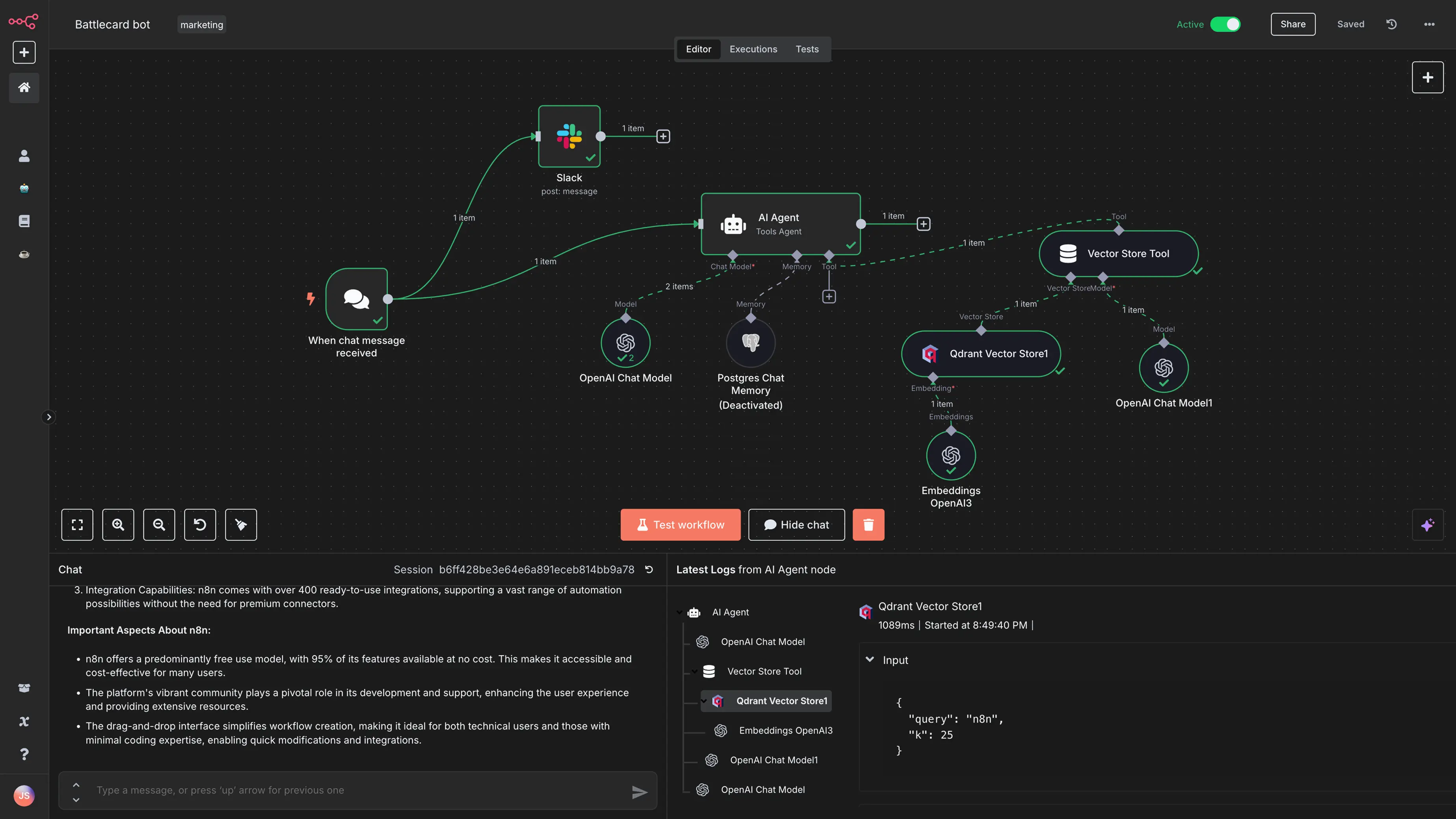
Quick Verdict: Is n8n a Good Zapier Alternative?
Yes, n8n is one of the strongest Zapier alternatives, especially for developers, technical teams, automation agencies, AI builders, startups, and businesses that need more control over workflow logic. It is not simply a cheaper version of Zapier. It is a different kind of automation platform: more flexible, more technical, more customizable, and better suited for complex workflows.
Zapier is still excellent for beginners and simple automations. If you only need to connect a form to a spreadsheet or send basic notifications, Zapier can be faster to set up. But if your workflow includes branching, loops, API calls, data transformation, AI processing, database actions, or self-hosted requirements, n8n can be the better long-term solution.
Ready to build flexible automation workflows with n8n?
Try n8n TodayWhat Is n8n?
n8n is a workflow automation platform that lets users connect apps, APIs, databases, AI models, and internal systems through a visual node-based builder. Instead of manually copying data between tools, you can create workflows that trigger automatically, process data, apply logic, and send the result to the right destination.
For example, a business could use n8n to capture a new website lead, enrich that contact with external data, score the lead, notify a sales team in Slack, create a CRM record, generate a personalized email using AI, and store the activity in a database. This is the type of automation where n8n becomes powerful: not just connecting apps, but controlling the entire data flow.
The platform is especially attractive because it gives users a middle ground between no-code and full-code automation. You can build many workflows visually, but when you need advanced transformations or custom logic, you can add code directly inside the workflow.
n8n Key Features Reviewed
1. Visual Workflow Builder
n8n uses a node-based workflow editor. Each node represents a trigger, action, data transformation, AI step, condition, API request, or logic operation. You connect these nodes to define how information moves from one step to another.
This visual structure is one of n8n’s biggest advantages. Instead of hiding automation logic inside a list of steps, n8n shows the workflow as a map. This makes it easier to understand where data starts, where it changes, and where it ends.
2. Integrations With Apps, APIs, and Databases
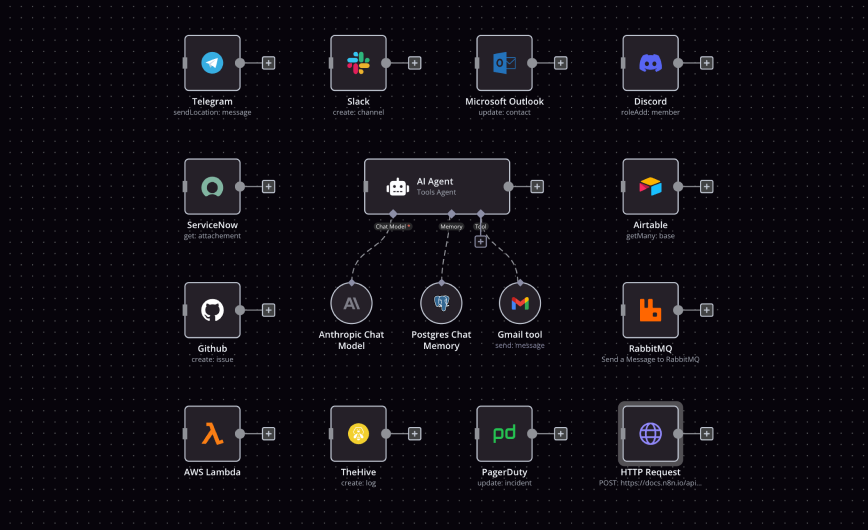
n8n supports a wide range of integrations across business apps, developer tools, communication platforms, databases, and AI services. Even when a pre-built integration is not available, users can often connect to a tool through an API using the HTTP Request node.
This is important because many businesses use niche software or internal systems that do not always appear in standard automation libraries. With n8n, users have more freedom to work with custom endpoints, headers, payloads, authentication methods, and API responses.
3. Code When You Need It
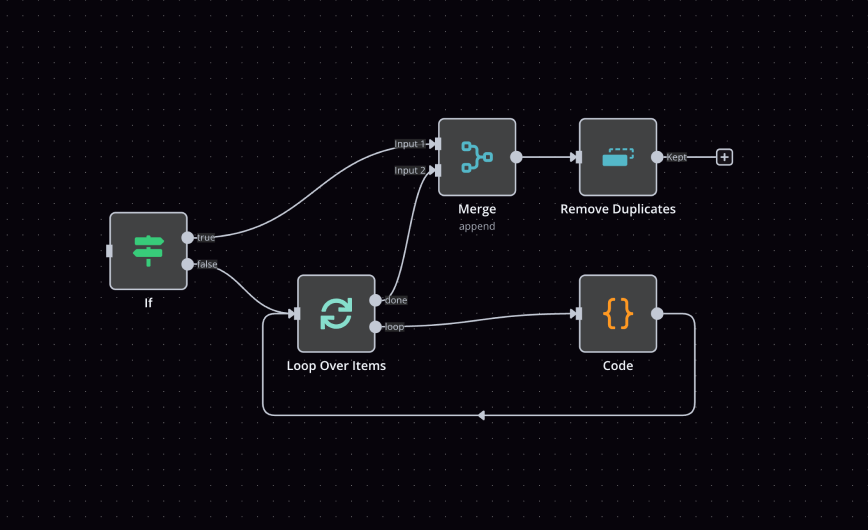
One of the reasons technical users like n8n is that it does not force a strict no-code-only experience. You can use visual nodes for common steps, then add JavaScript or Python when the workflow needs more advanced logic.
This makes n8n useful for data formatting, custom validation, conditional routing, error handling, and advanced transformations. Instead of switching to a separate backend script whenever a workflow becomes complicated, users can keep the logic inside the automation itself.
4. Webhooks and Custom API Workflows
Webhooks are central to many n8n workflows. You can create custom webhook URLs, receive data from external apps, process that data, and return a response. This makes n8n useful not only for marketing automation, but also for product operations, backend prototypes, internal tools, SaaS workflows, and customer support systems.
For teams that need automation beyond simple app connectors, webhook support is a major advantage. It allows n8n to act as an automation layer between multiple systems.
5. AI Workflow Automation
n8n is also becoming popular for AI automation. Users can design workflows that involve AI models, chat models, memory, vector stores, document processing, classification, summarization, and human approval steps.
This is where n8n goes beyond basic automation. Instead of using AI as a standalone chatbot, you can place AI inside a structured business process. A workflow can collect data, ask an AI model to analyze it, validate the output, send it to a human for approval, and then push the final result into a CRM, database, or communication tool.
n8n vs Zapier: Detailed Comparison
| Category | n8n | Zapier |
|---|---|---|
| Best For | Technical teams, developers, agencies, AI builders, and complex workflows | Beginners, small teams, and quick app-to-app automations |
| Ease of Use | Moderate learning curve, but powerful once understood | Very beginner-friendly and fast to start |
| Workflow Logic | Strong branching, merging, loops, filters, and custom logic | Good for simple and medium workflows |
| Code Support | Supports custom JavaScript and Python logic | Supports code steps, but feels more template-driven |
| API Flexibility | Excellent for custom API calls and webhook-driven workflows | Good, but more guided and less developer-focused |
| Self-Hosting | Available for teams that want infrastructure control | Not available as a standard self-hosted product |
| AI Automation | Strong for custom AI workflows and AI agents | Good for users who prefer a more managed experience |
The main difference is simple: Zapier wins on simplicity, while n8n wins on control. Zapier is easier for users who want to build a quick automation with minimal learning. n8n is better for users who want to design advanced workflows with custom logic, API control, AI processing, and more flexible deployment options.
Need more control than traditional no-code automation?
Start Building With n8nPros and Cons of n8n
Pros
- Excellent flexibility for complex workflows
- Visual editor makes automation logic easier to understand
- Supports JavaScript and Python inside workflows
- Strong API, webhook, and HTTP request capabilities
- Useful for AI agents and AI-powered business processes
- Self-hosting option for teams that need more control
- Good fit for technical teams, agencies, and automation builders
Cons
- Less beginner-friendly than Zapier
- Advanced workflows require planning and testing
- Self-hosting requires maintenance and security knowledge
- Non-technical users may prefer simpler guided templates
- Complex API workflows may still require developer support
Who Should Use n8n?
Developers and Technical Teams
n8n is ideal for teams that understand APIs, data structures, and workflow logic. Developers can use it to automate internal processes without building every integration from scratch.
Automation Agencies
Agencies can use n8n to build repeatable workflows for clients, connect multiple tools, manage custom business logic, and create advanced automations that go beyond simple templates.
AI Builders
If you are building AI assistants, AI agents, document workflows, research automation, or LLM-powered internal tools, n8n can act as the orchestration layer between your AI models and your business systems.
Businesses That Need Data Control
For businesses that care about where data is processed, n8n’s self-hosting option can be a strong advantage. It gives technical teams more control over deployment, infrastructure, and data handling.
Who Should Not Use n8n?
n8n may not be the best choice for users who want the easiest possible automation tool with almost no learning curve. If your only goal is to connect a form to a spreadsheet or send a basic email notification, Zapier may feel faster and more convenient.
n8n also may not be ideal for teams with no technical capacity and no interest in learning workflow logic, API behavior, debugging, or self-hosted deployment. It is powerful, but that power is best used by people who are willing to plan and test their automations carefully.
Best n8n Use Cases
- Lead automation: capture leads, enrich contact data, score prospects, and update a CRM.
- AI content operations: summarize research, generate drafts, classify content, and route approvals.
- Customer support automation: classify tickets, enrich customer profiles, and trigger escalation workflows.
- Internal alerts: monitor important events and notify teams through Slack, email, or other tools.
- Data synchronization: move data between databases, spreadsheets, CRMs, and internal platforms.
- Backend prototypes: create lightweight API-based workflows without building a full backend system.
Is n8n Worth It?
n8n is worth it if you need a workflow automation tool that can grow with your business and technical requirements. Its main advantage is not just pricing or integration count. The real advantage is flexibility. You can build visually, extend with code, connect to APIs, use AI models, and choose between cloud and self-hosted deployment depending on your needs.
Compared with Zapier, n8n feels more like an automation development environment than a simple app connector. That makes it more powerful, but also more demanding. For businesses that need deeper customization, n8n can become a central automation layer across marketing, sales, operations, support, and engineering.
Final Verdict
Overall rating: 4.7/5
n8n is not perfect for every user, but it is one of the most compelling Zapier alternatives for technical teams and advanced automation builders. It combines a visual workflow editor, code flexibility, AI automation, API power, and deployment freedom. If Zapier feels too limited, too expensive at scale, or too closed for your automation needs, n8n is absolutely worth testing.
Build smarter workflows with visual logic, code, APIs, and AI.
Try n8n NowFAQ About n8n
Is n8n better than Zapier?
n8n is better than Zapier for technical users who need advanced workflow logic, custom code, self-hosting, API flexibility, and AI orchestration. Zapier is usually easier for beginners and simple automations.
Can n8n be self-hosted?
Yes. n8n offers self-hosting options, which makes it attractive for teams that want more control over infrastructure, data, and deployment.
Does n8n support AI workflows?
Yes. n8n supports AI workflow automation and can be used to connect AI models, business apps, databases, approval steps, and custom logic inside one workflow.
Is n8n beginner-friendly?
n8n is learnable, but it is more technical than many simple no-code tools. Beginners can use templates, but users with API and automation knowledge will get the most value from it.
What is the best use case for n8n?
n8n is best for complex automation workflows involving APIs, databases, AI models, data transformation, multi-step logic, and internal business processes.